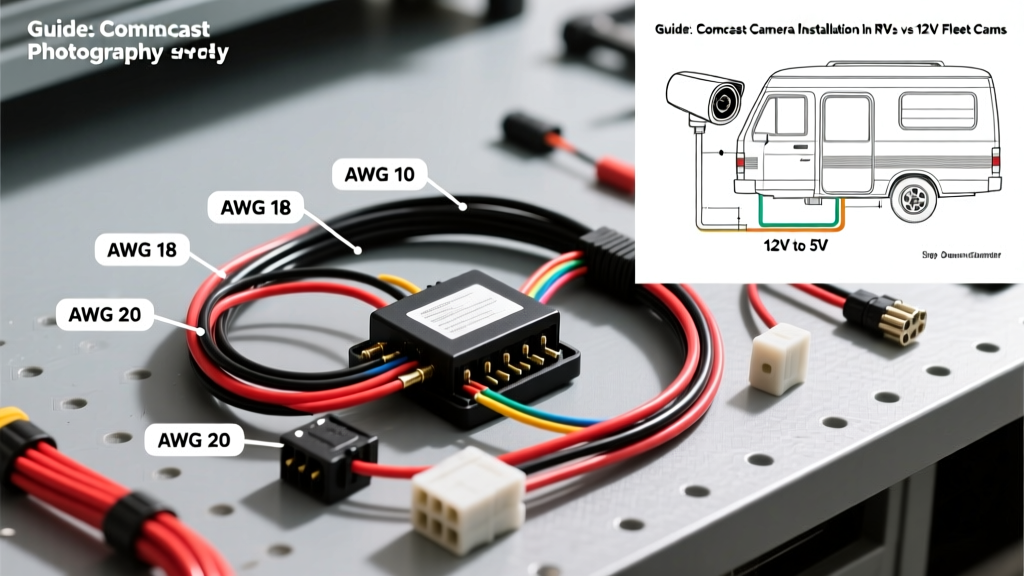
The Core Dilemma: Smart Home Ecosystems on the Road
As overlanding, mobile command centers, and full-time RV living surge in popularity, fleet managers and recreational vehicle owners increasingly seek unified security ecosystems. This trend has led to a unique technical challenge: adapting residential smart cameras for mobile, 12V DC environments. Specifically, attempting a Comcast camera installation in RVs and fleet trailers requires bridging the gap between Wi-Fi-dependent smart home hardware and rugged, 12V DC automotive electrical systems. While dedicated automotive backup and dash cameras are inherently built for load dump voltage spikes and high-frequency vibration, integrating a Comcast Xfinity Home outdoor camera into a vehicle demands precise DC-DC step-down wiring, RF shielding, and vibration-resistant termination to prevent catastrophic failure.
Product Comparison: Comcast Xfinity Outdoor vs. Dedicated 12V RV Cams
Before cutting into your vehicle's wire harness, it is critical to understand the electrical and environmental differences between residential smart cameras and automotive-grade surveillance. Residential cameras rely on stable 5V DC (via USB or proprietary barrel jacks) or Power over Ethernet (PoE), whereas automotive cameras operate natively on a fluctuating 12V-14.4V DC bus.
| Specification | Comcast Xfinity Home Outdoor (Gen 3) | Dedicated 12V Automotive/RV Cam (e.g., Furrion/OBS) |
|---|---|---|
| Input Voltage | 5V DC (Proprietary Barrel) or 120V AC via Adapter | 9V - 16V DC (Native Automotive) |
| Current Draw | ~1.2A (Peak during IR Night Vision) | ~0.3A (Standard) / 0.8A (Heated Lens) |
| Connector Type | 5.5mm x 2.1mm Barrel or USB-C | 4-Pin M12 Aviation or RCA/DC Combo |
| Load Dump Tolerance | None (Requires external suppression) | ISO 7637-2 Compliant (Up to 40V spikes) |
| Vibration Rating | Standard Residential (Wall mount) | SAE J1113 Compliant (Heavy machinery/RV) |
Wiring a Comcast Camera in an RV: 12V DC to 5V DC Step-Down Diagram
To successfully perform a Comcast camera installation on a 12V mobile platform, you must step down the vehicle's alternator-driven voltage (which fluctuates between 12.6V and 14.4V) to a stable 5V DC. Using a simple resistor network is unacceptable; you must use a switching buck converter to maintain efficiency and prevent thermal throttling inside enclosed RV bays.
Required Components & Wire Gauges
- DC-DC Buck Converter: 12V to 5V Step-Down Module (Rated for minimum 3A continuous output, e.g., LM2596-based or synchronous EPBOWPT modules).
- Primary Wire (12V Side): 16 AWG SAE J1128 primary automotive wire (Red for +12V, Black for Ground).
- Secondary Wire (5V Side): 18 AWG stranded copper (Red for +5V, White for Ground).
- Overcurrent Protection: 3A ATO/ATC blade fuse with an inline weather-resistant fuse holder.
- Connectors: Deutsch DT 2-pin connectors for the 12V side to ensure vibration resistance; IP67 heat-shrink solder seals for the 5V camera pigtail.
Step-by-Step Buck Converter Wiring Guide
- Locate the 12V House Battery Bus: Do not tap into the vehicle's chassis battery or alternator feed directly, as engine cranking voltage drops (down to 9V) will cause the buck converter to reset, dropping your Comcast camera offline. Tap into the dedicated RV 'House' battery bus bar.
- Install Overcurrent Protection: Crimp a ring terminal onto the positive 16 AWG red wire and secure it to the positive bus bar. Install the 3A inline ATO fuse within 6 inches of the power source to protect the entire run.
- Route to the DC-DC Converter: Route the 16 AWG wires to a dry, ventilated interior bay. Connect the Red (+12V) and Black (-12V) wires to the INPUT terminals of the buck converter. Torque the terminal screws to 0.5 Nm to prevent arcing.
- Step-Down Termination: Connect the 18 AWG wires to the OUTPUT terminals of the converter. Before connecting the camera, use a digital multimeter to verify the output is exactly 5.0V - 5.1V. Adjust the potentiometer on the buck converter if necessary.
- Camera Integration: Splice the 5V output to the Comcast camera's proprietary barrel jack pigtail using adhesive-lined marine-grade heat shrink. Apply dielectric grease to the barrel jack connection before sealing it inside an IP68 junction box mounted on the vehicle exterior.
- Establish a Star Ground: To prevent ground loops and alternator whine in the camera's audio feed, route the 12V ground wire directly back to the house battery negative bus. Do not ground the camera to the aluminum RV chassis, which can introduce RF interference and voltage differentials.
Power Over Ethernet (PoE) Mobile Integration
Some advanced fleet setups utilize PoE-enabled smart cameras. If your specific Comcast-compatible enterprise camera requires PoE (typically 48V DC), a standard 12V-to-5V buck converter will not suffice. You must install a 12V to 48V DC Boost Converter paired with a mobile PoE Injector. Ensure the boost converter is rated for at least 30W to handle the camera's pan/tilt/zoom (PTZ) motors and internal heating elements. Use CAT6 shielded twisted pair (STP) cabling for the exterior run, grounding the shield drain wire at the injector side only, to comply with SAE J1113 electromagnetic compatibility (EMC) standards.
Troubleshooting Mobile Smart Camera Failures
Residential cameras were not engineered for the harsh electrical environment of a moving vehicle. Below is a diagnostic decision tree for common failures encountered during mobile smart camera deployments.
| Symptom | Probable Cause | Technical Fix |
|---|---|---|
| Camera reboots randomly while driving. | Voltage drop across long 16 AWG wire runs during IR LED activation (current spike). | Upgrade the primary feed to 14 AWG wire or relocate the buck converter closer to the battery bus to minimize voltage drop. |
| Severe audio hum or 'alternator whine' in the mic feed. | Ground loop caused by grounding the 5V side to the chassis and the 12V side to the battery. | Isolate the grounds. Implement a single-point 'star ground' directly at the house battery negative terminal for both the converter and the camera shield. |
| Camera loses Wi-Fi signal when parked near metal structures. | Faraday cage effect from aluminum RV siding or steel fleet trailer walls blocking 2.4GHz/5GHz RF. | Install an external Wi-Fi repeater with a roof-mounted omni-directional antenna, routing the coaxial through a sealed gland plate. |
| Buck converter becomes too hot to touch. | Using a linear regulator (e.g., 7805) instead of a switching buck converter, or inadequate heat sinking. | Replace with a synchronous switching step-down module (efficiency >90%) and mount it to a metal chassis surface using thermal paste. |
Final Considerations for Fleet and RV Installers
While a dedicated 12V automotive camera is always the most reliable choice for exterior vehicle monitoring, integrating a residential smart camera like those used in Xfinity Home setups is entirely feasible with the correct power conditioning. By adhering to RVIA low-voltage wiring standards and utilizing proper automotive-grade terminations like Deutsch connectors, you can create a robust mobile surveillance node that integrates seamlessly with your home-based cloud ecosystem. Always verify the specific current draw of your exact camera model under maximum load (IR LEDs on, Wi-Fi transmitting) to properly size your DC-DC step-down equipment and inline fusing.
Authoritative References
- SAE J1113: Electromagnetic Compatibility Measurement Procedures and Limits - Guidelines for RF shielding and vibration resistance in mobile electronics.
- Recreational Vehicle Industry Association (RVIA) - Standards for low-voltage DC wiring and overcurrent protection in motorized and towable RVs.
- Xfinity Home Camera Setup & Power Requirements - Official documentation on input voltage and network latency tolerances for residential smart cameras.