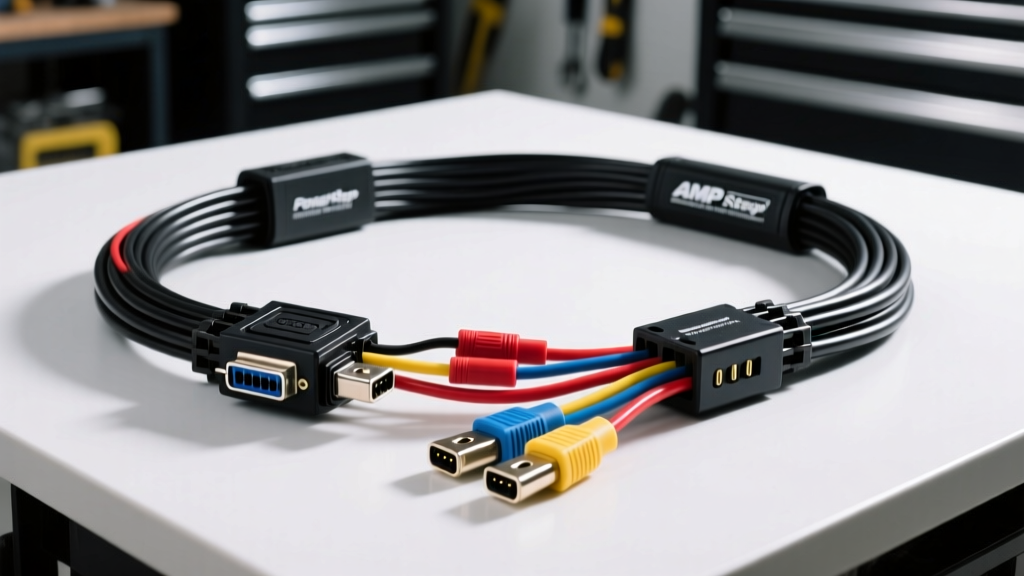
Upgrading to AMP Research PowerSteps: The Electrical Foundation
Upgrading your truck or SUV with AMP Research PowerSteps completely transforms the vehicle's accessibility and aesthetics. However, the mechanical deployment of the steps is only half the battle; the true reliability of the system relies entirely on the AMP Research wiring harness. Unlike simple 12V accessories, automatic running boards require precise logic signals to detect door states, manage motor polarity, and handle high inrush currents without triggering vehicle network faults.
As an automotive electrical specialist, I have diagnosed countless aftermarket step failures. In 90% of cases, the issue is not a burnt motor or a failed control module, but rather a compromised wiring harness, improper CAN bus integration, or severe voltage drop due to incorrect wire gauge routing. This comprehensive guide will walk you through the exact architecture, pinouts, and installation protocols required for a flawless AMP Research PowerStep harness integration.
Understanding the AMP Research Wiring Harness Architecture
The AMP Research PowerStep system utilizes a centralized control module that acts as the brain of the operation. The wiring harness is divided into three distinct sub-systems:
- High-Current Power & Ground Circuit: Supplies the raw amperage required to overcome the static friction of the deployment mechanism.
- Motor Actuation Leads: Carries switched, polarity-reversing 12V signals to the left and right stepper motors.
- Logic & Data Harness: Intercepts vehicle door-ajar signals via the OBD-II CAN bus or hardwired dome light triggers.
Understanding the separation of these circuits is critical. Running low-voltage logic wires parallel to high-current motor wires can induce electromagnetic interference (EMI), causing the control module to misread door states and deploy the steps erratically at highway speeds.
Wire Gauge, Pinout, and Connector Specifications
Before routing any wires, verify that your harness matches the OEM specifications. AMP Research engineers their kits to handle the specific inductive loads of their motors. Below is the standard specification chart for the primary power and logic harness.
| Wire Color | AWG Size | Function | Connector / Termination |
|---|---|---|---|
| Red | 12 AWG | Constant 12V+ Battery Feed | 30A MAXI Fuse / Ring Terminal |
| Black | 12 AWG | Primary Chassis Ground | Ring Terminal (Bolted to Frame) |
| Yellow | 18 AWG | Ignition / CAN Bus Logic | OBD-II T-Harness / Molex |
| Green | 18 AWG | Door Ajar Trigger Signal | T-Tap or Solder Sleeve |
| Blue/White | 14 AWG | Motor Output (Left/Right) | Deutsch DT 2-Pin |
Note: Always use a dedicated 12 AWG ground wire bolted directly to bare, unpainted chassis metal. Relying on factory grounding points shared with lighting circuits will introduce ground loops and voltage offsets.
OBD-II Integration: Tapping the CAN Bus Network
Modern vehicles (2008 and newer) utilize a Controller Area Network (CAN bus) to communicate door status. The AMP Research wiring harness typically includes an OBD-II plug-and-play module or T-harness to read the Door Ajar Parameter ID (PID) without cutting factory wires.
The OBD-II Pinout Standard
According to the SAE J1962 OBD-II Standard, the data link connector (DLC) follows a strict 16-pin layout. The AMP Research logic module interfaces with the following pins:
- Pin 4 (Chassis Ground): Used to establish a common ground reference for the logic board.
- Pin 5 (Signal Ground): Ensures clean data reading without electrical noise.
- Pin 6 (CAN-High): Carries the dominant high signal (typically 3.5V).
- Pin 14 (CAN-Low): Carries the dominant low signal (typically 1.5V).
- Pin 16 (Battery+): Provides constant 12V to keep the module in a low-power sleep/monitoring state.
Why You Must Never Splice CAN-H and CAN-L Directly
The CAN bus operates on a strict 120-ohm impedance topology. Splicing into Pin 6 and Pin 14 with standard T-taps introduces resistance and capacitance that can degrade the differential signal. This frequently triggers U-codes (e.g., U0140 Lost Communication with Body Control Module) and can cause the vehicle to enter limp mode. As detailed in the CSS Electronics CAN Bus Tutorial, maintaining the physical layer integrity of the twisted pair is non-negotiable. Always use the provided AMP Research non-destructive OBD-II T-harness or plug-in module to preserve the factory CAN bus termination resistors.
Hardwired Door Ajar Signals (Legacy and Off-Road Vehicles)
If you are installing PowerSteps on a classic truck, a dedicated off-road rig, or a vehicle with a proprietary multiplexed network that the OBD module cannot read, you must hardwire the 18 AWG Green door trigger wire into the factory dome light circuit.
Vehicle-Specific Trigger Wire Identification
Use a Digital Multimeter (DMM) to verify the trigger type before splicing. Splicing a 12V+ trigger into a ground-switching circuit will backfeed voltage into the BCM, potentially frying the factory door logic board.
- GM Trucks (1999-2006 GMT800): Locate the Light Green/White wire in the lower kick panel. This is a Ground-Trigger circuit. The AMP module must be configured (via internal DIP switch or jumper) to activate on ground.
- Ford F-Series (2004-2014): The Brown/Yellow wire typically carries a 12V+ Trigger when the door opens.
- Ram Trucks (2009-2018): Violet/White is generally the Ground-Trigger for the dome light circuit.
Pro-Tip: Never tap directly into the LED dome light fixture itself. The low current draw of LEDs and the presence of PWM (Pulse Width Modulation) dimming circuits will cause the AMP Research module to misread the door state. Always tap the trigger wire at the BCM or the A-pillar door jamb boot.
Routing, Looming, and Weatherproofing
The undercarriage environment is hostile. Road debris, water, and extreme heat will destroy an unprotected wiring harness in a matter of months.
- Firewall Pass-Through: Never drill a new hole through the firewall unless absolutely necessary. Locate the main factory body harness grommet on the driver's side. Use a blunt-tipped awl to pierce the rubber, and coat the AMP harness in wire lubricant before feeding it through. This maintains the cabin's weather seal and prevents exhaust fumes from entering the cab.
- Exhaust Clearance: Maintain a minimum 12-inch clearance from any exhaust components. If routing near the transmission crossmember, use high-temperature fiberglass sleeving over the split loom.
- Motor Connections: The Deutsch DT connectors at the step motors are waterproof, but only if assembled correctly. Ensure the silicone gasket is fully seated and apply a dab of dielectric grease to the pins before mating. Secure the connector to the step linkage with zip-ties to prevent vibration-induced fretting corrosion.
- Looming: Wrap the entire undercarriage harness in corrugated split loom, then wrap the loom in Tesa 51036 PET cloth tape. This prevents the plastic loom from rattling against the frame and provides an extra layer of abrasion resistance.
Troubleshooting Common Harness Failure Modes
Even with meticulous installation, issues can arise. Use this symptom-cause-fix decision tree to diagnose harness-related problems.
Symptom: Steps Deploy but Retract Sluggishly or Stutter
- Cause: Severe voltage drop on the 12 AWG power or ground wires. The motors require peak amperage during the initial deployment and final retraction phases (overcoming the mechanical cam detents).
- Fix: Connect your DMM directly to the power and ground terminals at the AMP control module. Have an assistant trigger the steps. If the voltage drops below 10.5V under load, your 12 AWG wire run is too long, or your chassis ground is corroded. Upgrade to 10 AWG for the main power feed and clean the ground point with a wire wheel.
Symptom: Steps Deploy Randomly While Driving on the Highway
- Cause: CAN bus sleep mode misinterpretation or a faulty door trigger splice picking up EMI noise from the alternator.
- Fix: If hardwired, check your splice. A loose T-tap can act as an antenna, picking up alternator whine and tricking the module into thinking a door opened. Cut out the T-tap, strip the wires, and use a solder seal splice connector with heat shrink. If using the OBD-II module, consult AMP Research Technical Support for a firmware update to adjust the CAN bus PID filtering thresholds.
Symptom: Battery Drain Over 48 Hours
- Cause: The OBD-II T-harness is preventing the vehicle's Body Control Module (BCM) from entering deep sleep mode.
- Fix: Verify that Pin 16 (Constant 12V) on the AMP module is drawing less than 15mA when the vehicle is asleep. If it draws more, the module is failing to read the CAN bus 'sleep' broadcast. Ensure the OBD-II connector pins are tight; loose pins can cause data packet loss, keeping the AMP module awake indefinitely.
Final Verification
Before zip-tying the harness and mounting the control module permanently, perform 20 consecutive open/close cycles. Monitor the temperature of the 30A MAXI fuse and the 12 AWG power wire. They should remain cool to the touch. Once verified, secure the module in a protected, dry area inside the cabin or high in the engine bay, away from direct water spray and moving steering components. A properly installed AMP Research wiring harness will provide years of silent, reliable operation.