Integrating Residential Smart Switches into RV 120V AC Systems
Upgrading the interior lighting of a Class A motorhome, fifth-wheel, or custom camper van often involves borrowing the best technology from residential electrical systems. One of the most requested upgrades for RV hallways, bathrooms, and stairwells is automated lighting. However, adapting a residential lutron 3-way motion sensor switch wiring diagram to a recreational vehicle requires a deep understanding of both NEC Article 551 (Recreational Vehicles) and the unique power environments of an RV, including inverter sub-panels and chassis vibration. This complete wiring walkthrough will guide you through installing a Lutron Maestro 3-Way Motion Sensor (Model MS-OPS5MH or similar) into your RV’s 120V AC lighting circuit, ensuring reliable operation whether you are plugged into shore power or boondocking off your inverter.
Understanding the Lutron 3-Way Motion Sensor Architecture
Unlike standard single-pole motion sensors, a 3-way setup allows you to control a light from two different locations—ideal for an RV bedroom where you want a sensor at the door and a manual override switch near the bed. The Lutron Maestro 3-way motion sensor system requires two components: the electronic motion sensor switch itself, and a standard mechanical 3-way companion switch. The motion sensor handles the microprocessor logic, triac switching, and occupancy detection, while the traveler wire communicates the state of the companion switch back to the sensor.
In an RV environment, the physical wiring topology often mirrors residential Romex runs, but the wire types and termination methods must be adapted for mobile applications. Standard wire nuts are highly discouraged in RV 120V AC switch cavities due to the constant vibration of highway travel, which can loosen connections and cause arcing.
Terminal Identification and RV Wire Mapping
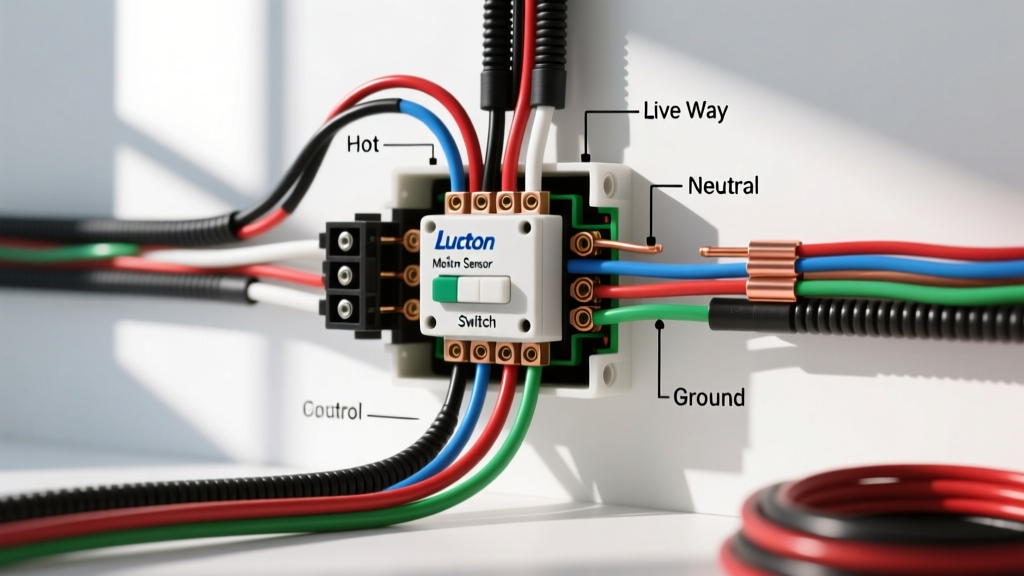
The Lutron 3-way motion sensor features four distinct wire leads. Proper identification of your RV’s existing 120V AC wall cavity wires is critical before making any connections. Below is the mapping of the Lutron sensor leads to standard RV 120V AC wiring colors.
| Lutron Sensor Lead | Lead Color | RV 120V AC Wire Color | Function / Terminal | AWG Spec |
|---|---|---|---|---|
| Line / Hot | Brass (Yellowish) | Black | Constant 120V from RV Breaker Panel | 14 AWG (15A) / 12 AWG (20A) |
| Load | Black | Red or Blue | Switched Leg to Light Fixture | 14 AWG / 12 AWG |
| Traveler | Blue | White (Re-marked Black) | Communication to Companion 3-Way Switch | 14 AWG / 12 AWG |
| Ground | Green | Bare Copper / Green | Equipment Grounding Conductor (EGC) | 14 AWG / 12 AWG |
Note: In many RV 3-way circuits, the white wire is used as a traveler. Per NFPA 70 (NEC) standards, this white wire must be re-marked with black electrical tape or heat shrink at both ends to indicate it is carrying hot voltage, not serving as a neutral.
Step-by-Step Installation Walkthrough
Before beginning, ensure your RV is disconnected from shore power, the generator is off, and the 12V DC disconnect is thrown to prevent any inverter auto-start sequences. Verify the circuit is dead using a non-contact voltage tester and a digital multimeter.
Step 1: Prep the Switch Cavity for Mobile Vibration
Remove the existing mechanical 3-way switch from the primary location (usually the hallway or entry door). Inspect the wiring. If your RV uses solid-core NM-B (Romex), ensure there is enough slack. Because RVs flex and vibrate, solid core wire can fatigue and snap over time. If the wire is damaged, cut it back and splice in a short pigtail of 14 AWG stranded THHN wire using a crimped butt connector with marine-grade heat shrink.
Step 2: Terminate with Vibration-Resistant Connectors
Do not use standard twist-on wire nuts. Instead, use WAGO 221 Lever-Nuts. These inline or compact splicing connectors are rated for 120V AC, handle both stranded and solid wire, and are completely immune to vibration-induced loosening. Connect the Lutron Brass lead to the RV Black (Line) wire, the Lutron Black lead to the RV Load wire, and the Lutron Blue lead to the RV Traveler wire using WAGO 3-port connectors.
Step 3: Establish a Reliable Ground
The Lutron motion sensor requires a dedicated Equipment Grounding Conductor (EGC) to function safely and to shield its internal microprocessor from RF interference generated by RV microwaves and inductors. Connect the Lutron Green lead to the RV’s bare copper or green ground wire. If your RV uses a metal junction box, ensure the box itself is bonded to the ground bus, but always prioritize a direct wire-to-wire ground connection for the sensor.
Step 4: Wire the Companion Switch
At the second location (e.g., the bedside), install a standard mechanical 3-way switch. Connect the Line or Load (depending on the circuit topology) to the Common (dark colored) screw, and the two Travelers to the brass/light-colored screws. Ensure all connections here are also secured with lever-nuts or high-torque crimp terminals to survive road travel.
Crucial RV Power Considerations: Inverters and Sine Waves
The most common point of failure when installing a Lutron 3-way motion sensor in an RV is related to the inverter. If your hallway or bathroom lighting circuit is backed by an inverter for boondocking, you must verify the inverter's output waveform.
- Modified Sine Wave (MSW) Inverters: MSW inverters produce a stepped, square-like wave that severely disrupts the triacs and microprocessors inside Lutron motion sensors. This will cause the sensor to hum, flicker, overheat, or fail entirely. It will also cause LED bulbs to 'ghost' (stay dimly lit when off).
- Pure Sine Wave (PSW) Inverters: PSW inverters (like those from Victron, Magnum, or WFCO) produce grid-quality AC power. The RV Industry Association (RVIA) increasingly recommends PSW inverters for modern RVs specifically to support sensitive residential electronics and smart switches.
If you have an MSW inverter, you must move the lighting circuit to a non-inverter-backed breaker, or upgrade to a PSW inverter before installing the Lutron sensor.
Troubleshooting Common RV-Specific Failures
If your installation results in erratic behavior, consult this RV-specific troubleshooting matrix:
| Symptom | Probable RV-Specific Cause | Corrective Action |
|---|---|---|
| LED lights 'ghost' or flicker when off | Capacitive coupling in long RV wire runs; MSW inverter distortion. | Install a Lutron LUT-MLC capacitor across the first light fixture's Line and Neutral. Ensure inverter is PSW. |
| Sensor resets randomly while driving | Voltage drop or neutral-to-ground bond fault on inverter sub-panel. | Check the inverter's internal bonding relay. Ensure 14 AWG wire is used to minimize voltage drop over long RV chassis runs. |
| Companion switch fails to toggle light | Traveler wire misidentified; White wire used as neutral instead of traveler. | Trace the 3-wire cable between switches. Re-mark the white traveler wire with black tape and re-terminate on the brass traveler screws. |
| Sensor hums loudly | Incompatible LED driver on 120V AC RV puck lights. | Replace RV LED puck lights with Lutron-tested, forward-phase dimmable LED drivers. |
Final Inspection and Safety Verification
Once all WAGO connections are made and the switches are seated into the RV wall cavity, carefully push the wires back, ensuring no sharp metal edges from the wall cutout can slice the insulation. Turn the breaker back on at the RV main distribution panel. Test the motion sensor's timeout and sensitivity dials (located behind the sensor's faceplate) to ensure it accurately detects movement in the narrow confines of an RV hallway. For more advanced RV electrical schematics and chassis-specific grounding diagrams, consult your manufacturer's service manual or reference Lutron's advanced application guides for multi-location occupancy sensing.