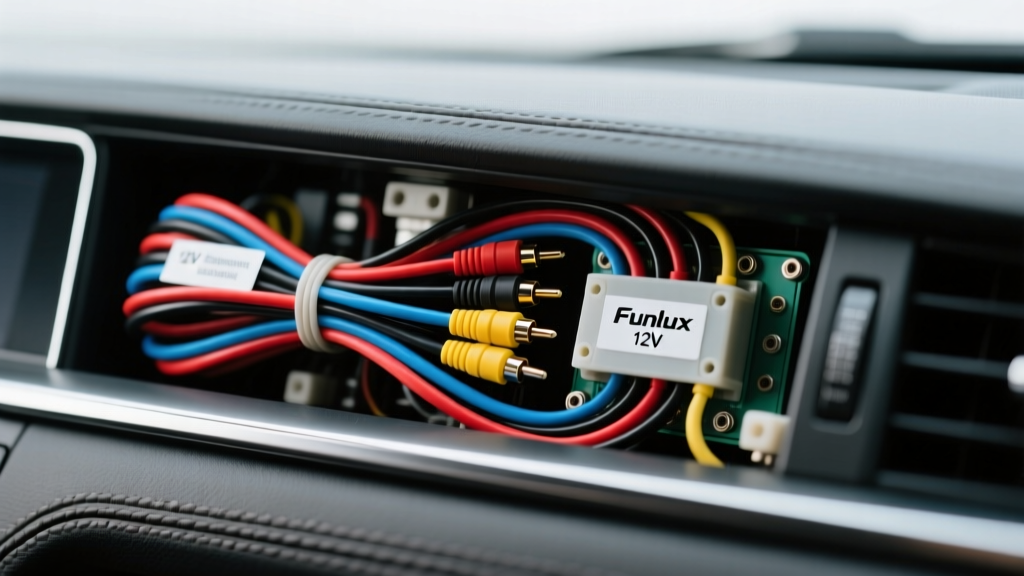
Funlux Camera Wiring Diagram Overview
When performing a Funlux camera installation in an automotive, RV, or heavy-duty truck application, understanding the complete wiring diagram is critical for a reliable, noise-free video feed. While Funlux is widely recognized for its security systems, adapting their 12V DC automotive and RV backup cameras into a vehicle's electrical architecture requires strict adherence to mobile electronics standards. A proper installation goes far beyond simply splicing into a tail light; it requires regulated power delivery, shielded signal routing, and precise reverse trigger integration.
This complete wiring diagram walkthrough breaks down the exact pinouts, wire gauges, and routing strategies required to integrate a Funlux backup camera with an aftermarket double-DIN head unit or a standalone 7-inch monitor. By following these specifications, you will eliminate common failure modes such as alternator whine, voltage drop-induced flickering, and water ingress at the harness connections.
Power and Ground Specifications (12V DC System)
The most common point of failure in any automotive camera installation is dirty power. Vehicle alternators produce AC ripple and voltage spikes that can severely degrade the image sensor of a Funlux camera or cause the internal voltage regulator to overheat. According to the Mobile Electronics Certification Program (MECP) guidelines, camera power should ideally be sourced from a clean, switched 12V circuit or regulated via a DC-DC buck converter.
Wire Gauge and Voltage Drop Calculations
For standard passenger vehicles (wire runs under 15 feet), 18 AWG stranded copper wire is sufficient for the 12V power and ground leads. A typical Funlux automotive camera draws between 150mA and 300mA. Using the standard resistance of 18 AWG wire (6.385 ohms per 1,000 feet), the voltage drop over a 15-foot run at 0.3A is a negligible 0.028V. However, for RVs or commercial trucks where the wire run from the battery or front fuse box to the rear bumper exceeds 20 feet, you must upgrade to 16 AWG wire to prevent voltage drop below the camera's minimum operating threshold of 10.5V.
- Power Wire: 18 AWG (Red) for cars; 16 AWG for trucks/RVs.
- Ground Wire: 18 AWG (Black) terminated to a clean, unpainted chassis ground near the camera.
- Inline Fuse: 2A or 3A ATO/ATC blade fuse installed within 6 inches of the power source.
Camera Harness Pinout and Connector Table
Most Funlux automotive cameras utilize a 4-pin or 5-pin weatherproof connector at the camera head, which breaks out into standard RCA and bare wire leads at the routing end. Below is the standard pinout configuration for the Funlux 4-pin automotive harness. Always verify with your specific model's manual, as OEM variations exist.
| Pin Number | Wire Color | Function | Vehicle Connection Point | AWG / Spec |
|---|---|---|---|---|
| 1 | Red | 12V DC Power (+) | Reverse Light (+) or Switched Accessory | 18 AWG |
| 2 | Black | Ground (-) | Chassis Ground or Tail Light (-) | 18 AWG |
| 3 | Yellow (Shielded) | Composite Video Signal | Head Unit RCA Camera Input | RG59 / 75 Ohm |
| 4 | White/Green | Reverse Trigger (Optional) | Head Unit Reverse Sense Wire | 22 AWG |
Routing the Video Signal and RCA Connections
The video signal cable is the most vulnerable component in the Funlux camera installation diagram. The composite video signal operates at a low voltage (typically 1V peak-to-peak) and is highly susceptible to Electromagnetic Interference (EMI) generated by the vehicle's ignition system, fuel pumps, and alternator.
Shielding and Ground Loop Prevention
Never route the camera's RCA video cable parallel to the vehicle's main wiring harness or high-current amplifier power wires. Always cross high-current wires at a 90-degree angle to minimize inductive coupling. If your Funlux camera kit includes a standard unshielded RCA cable, replace it with an RG59 shielded coaxial cable featuring a 95% copper braid shield. Furthermore, ensure the RCA shield is grounded at the head unit end only; grounding both ends creates a ground loop, which manifests as a high-pitched alternator whine that pulses with engine RPM. If a ground loop persists, install a 12V DC video ground loop isolator in-line with the RCA cable near the head unit.
Reverse Trigger Integration
To force the aftermarket head unit to switch to the camera display when the vehicle is shifted into reverse, the reverse trigger wire must be properly integrated. There are two primary methods for wiring the reverse trigger in a Funlux camera setup:
- Method A (Head Unit Sense): Run a 22 AWG wire from the vehicle's reverse lamp positive circuit at the rear of the vehicle all the way to the head unit's 'Reverse' or 'Back' trigger wire (usually purple or orange/white depending on the brand). The head unit's trigger circuit is high-impedance and draws less than 50mA, so a heavy-gauge wire is unnecessary.
- Method B (Local Relay Switching): If the head unit is already configured to switch inputs via a different method, or if you are using a standalone monitor, wire a standard 12V automotive relay (Bosch-style 5-pin). Use the reverse light circuit to trigger the relay coil (Pins 85 and 86), and use the relay's switched output (Pin 87) to send 12V to the monitor's reverse trigger input.
Expert Tip: Modern vehicles with CAN-bus systems or PWM (Pulse Width Modulated) tail lights often cause backup cameras to flicker or fail to trigger. In these vehicles, you must install a 12V DC relay or a dedicated PWM-to-DC filter module to convert the pulsed signal into a clean, steady 12V trigger for the Funlux camera and head unit.
Weatherproofing and Connector Selection
The transition point between the camera's pigtail and the vehicle's main harness is typically located behind the bumper or inside the trunk lid. This area is exposed to extreme moisture, road salt, and temperature fluctuations. Standard crimp connectors or solder-seal heat shrink are insufficient for long-term reliability in this environment.
For a professional-grade Funlux camera installation, utilize Deutsch DT series connectors or Molex MX150 sealed connectors. These connectors feature silicone grommets that seal around the individual wires, preventing capillary action from wicking moisture into the camera housing. Always apply dielectric grease to the connector pins before mating, and wrap the final harness loom in corrugated tubing secured with UV-resistant zip ties.
Troubleshooting Common Installation Issues
Even with a meticulous wiring diagram walkthrough, real-world variables can cause issues. Use this diagnostic tree to resolve common Funlux camera installation anomalies:
Symptom 1: Camera Image Flickers or Rolls
- Cause: Insufficient voltage at the camera head or AC ripple from the alternator.
- Fix: Measure voltage at the camera pigtail with the engine running. It should read 13.2V to 14.4V DC. If it reads below 11.5V, check for voltage drop on the ground wire. If voltage is present but noisy (AC ripple), install a 12V DC filter capacitor or a DC-DC isolated power supply.
Symptom 2: High-Pitched Whine in Audio/Video
- Cause: Ground loop on the RCA video shield or shared ground paths with high-current amplifiers.
- Fix: Verify the RCA shield is grounded only at the head unit chassis. Install a video ground loop isolator. Ensure the camera's 12V ground is tied to a dedicated chassis point, not shared with a fuel pump or tail light ground.
Symptom 3: Head Unit Fails to Switch to Camera View
- Cause: PWM tail light signal confusing the head unit's trigger circuit, or a blown inline fuse.
- Fix: Use a multimeter to verify steady 12V DC at the head unit's reverse trigger wire when the vehicle is in reverse. If the voltage fluctuates rapidly, install a 12V relay to isolate the CAN-bus/PWM signal from the head unit's sense circuit.
For further reference on automotive wiring standards and low-tension primary cable specifications, consult the SAE J1128 Standard documentation to ensure your wire selections meet the thermal and abrasion resistance requirements of the automotive environment. Proper execution of this Funlux camera wiring diagram will result in a factory-grade, reliable backup camera system that withstands the rigors of daily driving.